Sprite Studio
A free pixel-art editor for drawing and animating game sprites, with named animations, hit areas, tiles and export straight into Godot, all in your browser.
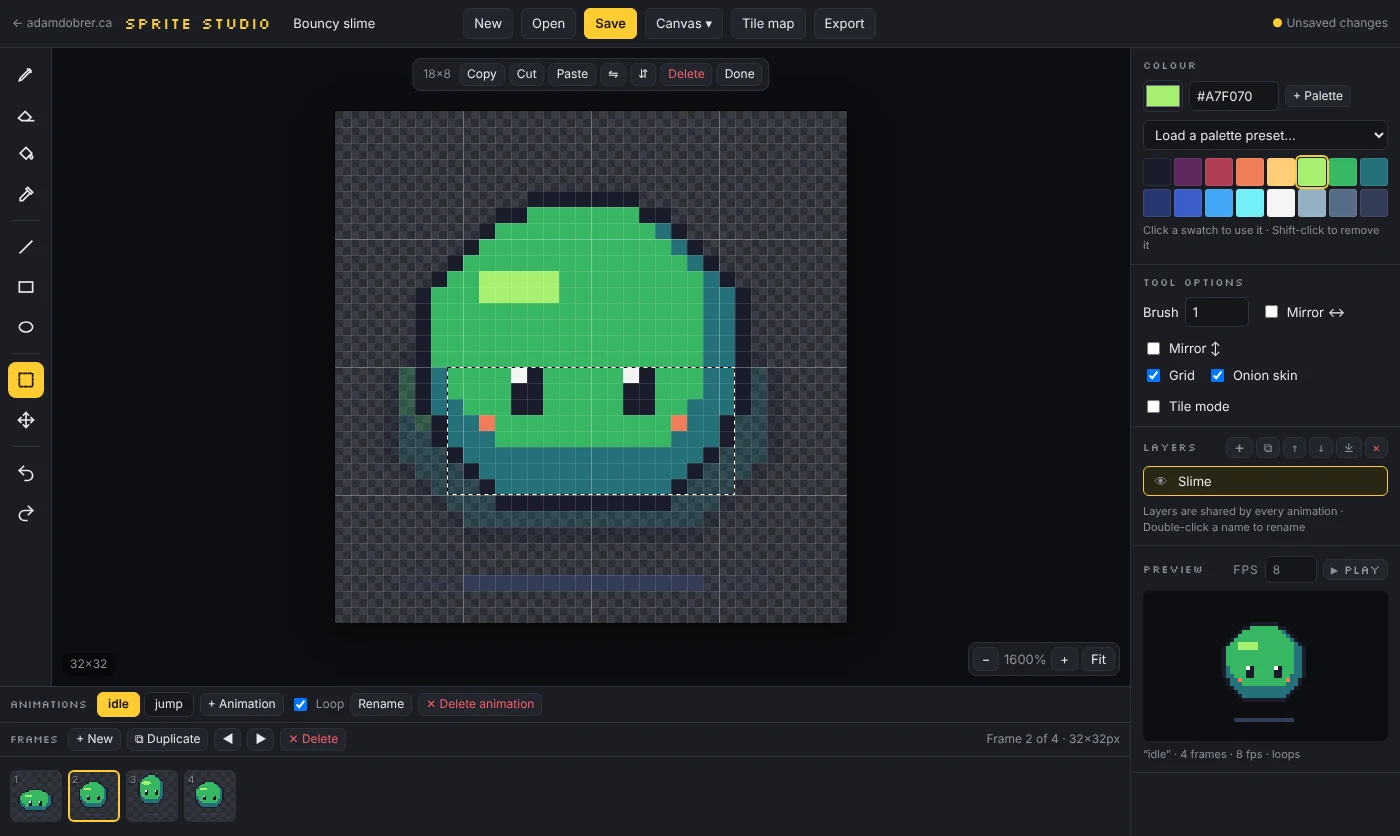
What it does
Draw sprites pixel by pixel on a canvas from 8×8 up to 256×256: pencil, eraser, fill, colour picker, lines, rectangles and ellipses, with brush sizes and mirror drawing for symmetrical characters. A shade brush darkens or lightens what's already there, stepping through your palette like a colour ramp, and any tool can paint in a dither pattern. Select part of a sprite to move, flip, rotate, copy or paste it, even into another frame. Pick colours from ready-made retro palettes like PICO-8, Sweetie 16 and Game Boy, or build your own.
Animate it
Give a character as many animations as it needs, like idle, walk, jump and hurt, each with its own frames and speed, set to loop or play once. Onion skin shows the previous frame faintly underneath so the next pose lines up, and the preview plays the animation you're on. Layers keep a character's outline, colours and effects separate. Colour swap recolours every frame at once, or saves the result as a new variant, so one character can become a whole set of enemies.
Build levels
Tile mode shows the sprite repeated around itself, so you can see the seams while you draw, and the Move tool wraps around the edges to fix them. Then lay your tiles out on a test map to see how a level looks, and save it as an image.
Hit areas
Draw body boxes (where a character can be hit and what bumps into walls) and attack boxes (where its attack lands) on each frame, and set the origin point that sits on the ground.
Use it in a game
Export straight to Godot 4: drag the scene into a level and the character plays its animations with crisp pixels, stands on its origin point, and has body and attack areas that follow the hit areas frame by frame, mirrored when it turns around. Tested in Godot 4.3. For other engines like Unity or Phaser there's a sprite sheet with one row per animation and a JSON file listing every frame, its hit areas and the origin. You can also save PNGs scaled up to 16× with crisp pixels, or an animated GIF to share, and slice an existing sprite sheet back into animations.
Private by design
Everything runs in your browser. Save keeps your sprites in this browser, and a project file lets you move one to another device. Nothing is uploaded.
Data and licences
The PICO-8 palette is by Lexaloffle and Sweetie 16 by GrafxKid. Headings use the Silkscreen font by Jason Kottke (SIL Open Font Licence).
Source code on GitHub (MIT) · SIL Open Font Licence · Silkscreen
for the video games I'm going to make
- Exports
- Godot 4 scene, sprite sheet + JSON, PNG, GIF
- Animations
- As many per sprite as you need
- Canvas
- 8×8 up to 256×256
- Year
- 2026
- Built with
- JavaScript, Canvas
- Code
- github.com/adobrer99-max/sprite-studio
- Last updated